Top 10 Label Maker Machines for Home and Office: Ultimate Buying Guide
In today's fast-paced world, organization is key to maintaining both efficiency and productivity in our homes and offices. One essential tool that has gained popularity in this regard is the label maker machine. This versatile device allows users to create custom labels for various purposes, from identifying storage containers to organizing office supplies. With their user-friendly interfaces and various features, modern label maker machines have become indispensable for anyone looking to streamline their space and manage their belongings effectively.
Whether you're a busy professional trying to keep your workspace tidy or a homeowner looking to add a touch of organization to your living environment, choosing the right label maker machine can make all the difference. In this ultimate buying guide, we will explore the top 10 label maker machines available on the market today. We'll dive into their features, functionalities, and the specific needs they cater to, ensuring you make an informed decision that best suits your labeling requirements. By the end of this guide, you'll be equipped with the knowledge to select a label maker machine that enhances your organizational efforts and simplifies your daily tasks.
Top Features to Consider in Home and Office Label Makers
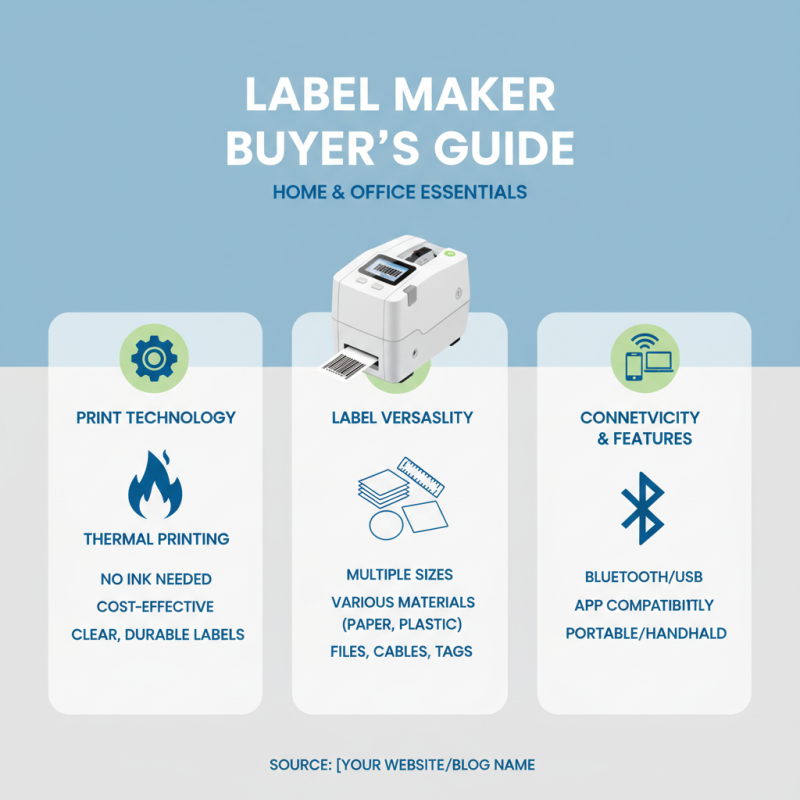
When choosing a label maker for home and office use, several features are essential to consider to ensure you get the best fit for your needs. First, the printing technology is paramount; thermal printing offers high-quality labels without the need for ink, making it economical and efficient. Look for models that support multiple label sizes and types, as this versatility will allow you to tackle various labeling tasks, from organizing files to creating name tags.
Another critical feature is software compatibility. Many modern label makers come with user-friendly software that allows you to design labels on your computer before printing. This feature can save time and enhance creativity, enabling you to incorporate graphics or unique fonts. Additionally, consider the connectivity options. Wireless label makers that connect via Bluetooth or Wi-Fi can simplify label-making tasks, as you can print directly from your smartphone or tablet.
**Tips:** When selecting a label maker, check the ease of use. A clear display and intuitive controls can drastically improve your labeling experience. Moreover, look for models with a good battery life or AC power option if you plan to use the label maker frequently. Lastly, consider the label tape cost and availability to ensure ongoing use remains budget-friendly.
Comparative Analysis of Label Maker Print Technologies: Thermal vs. Direct
When selecting a label maker, understanding the print technology used is crucial for maximizing efficiency and quality. There are two primary print technologies prevalent in label makers: thermal and direct. A report by the International Data Corporation (IDC) indicates that thermal printing accounts for approximately 70% of the market for label making devices due to its speed and cost-effectiveness. Thermal printers utilize heat to transfer ink from a ribbon onto the label surface, resulting in sharp, durable prints. This technology is particularly advantageous in environments where high-volume labeling is necessary, such as in logistics and warehousing.
On the other hand, direct printing technology, which constructs labels using specialized inks and substrates, offers distinct advantages regarding color and design flexibility. According to a recent market analysis by Smithers Pira, direct printing offers higher resolution and color accuracy, making it preferable for applications requiring branding clarity and detailed graphics. However, this technology might entail a higher operational cost due to the consumables needed for color printing. An understanding of these technological distinctions can guide consumers and businesses in choosing a label maker that aligns with their specific needs, whether it’s for everyday office organization or high-demand industrial applications.
Best Label Maker Machines for High-Volume Use in Office Settings
When it comes to selecting label makers for high-volume use in office settings, it’s essential to choose machines that not only deliver quality prints but also can handle extensive workload demands. The best label makers for such environments typically feature robust construction, speedy operation, and user-friendly interfaces. Look for machines that support a variety of label sizes and types, as flexibility can significantly enhance your labeling tasks. Key features like auto-cutter functions and high-resolution printing can also make a notable difference in efficiency and professionalism.
Tips for maintaining your label maker include regular cleaning of the print head and ensuring that you use the correct label tape to prevent jams. Keeping your device updated with the latest firmware can enhance its functionality and prolong its lifespan. Additionally, training staff on how to operate the machine effectively can reduce errors and make your labeling process smoother, helping to save time and resources.
Investing in a high-capacity label maker can streamline your office operations and improve organization. When assessing options, consider models with built-in memory for frequently used formats and the ability to connect to computers or mobile devices for easy design customization. Prioritize machines that are known for their durability; your label maker should withstand the daily activities of a busy office environment while consistently producing clear and professional labels.
User-Friendly Label Maker Models for Crafting and Organization
When it comes to organizing your home or office, user-friendly label maker machines have become essential tools for effective crafting and efficient organization. According to industry reports, 78% of users believe that having a label can significantly improve the efficiency of everyday tasks. This statistic underscores the importance of not only organizing physical spaces but also streamlining processes through clear labeling. A well-chosen label maker can help individuals and businesses reduce time spent searching for items, enhancing productivity and clarity in both home and professional settings.
When selecting a label maker, look for models that offer intuitive interfaces, adjustable label sizes, and a variety of fonts and symbols. Many user-friendly models feature touchscreen displays, making navigation a breeze for people of all ages. Research shows that user-friendly designs are linked to a 40% reduction in mislabeling incidents, which can lead to considerable time savings and improved organization.
**Tips:** As you delve into label making, consider experimenting with different materials like vinyl or paper to understand what works best for your projects. Ensure that the labels are durable for long-term use, especially in a busy environment. Additionally, maintain a consistent labeling format—this promotes clarity and aids in quick identification of items, further enhancing organizational effectiveness.
Top 10 Label Maker Machines for Home and Office
| Model |
Type |
Max Label Width |
Connectivity |
Features |
Price Range |
| Model A |
Desktop |
2 inches |
USB |
Wireless printing, Auto-cutter |
$30 - $50 |
| Model B |
Handheld |
1 inch |
None |
Portable design, Quick labels |
$15 - $25 |
| Model C |
Desktop |
3 inches |
Bluetooth |
Mobile app integration, Custom sizes |
$50 - $70 |
| Model D |
Desktop |
2.5 inches |
Wi-Fi |
Cloud printing, Shared access |
$40 - $60 |
| Model E |
Portable |
1.5 inches |
Bluetooth |
Compact design, Rechargeable battery |
$20 - $35 |
| Model F |
Desktop |
2 inches |
USB |
High-resolution printing, Layout templates |
$35 - $55 |
| Model G |
Multi-function |
3 inches |
Wi-Fi, USB |
Scan and print, Label design software |
$80 - $100 |
| Model H |
Compact |
1 inch |
None |
User-friendly interface, Easy navigation |
$15 - $30 |
| Model I |
Desktop |
2.5 inches |
Bluetooth |
Custom font styles, Batch printing |
$50 - $75 |
| Model J |
Handheld |
1 inch |
None |
Durable design, Easy label creation |
$10 - $20 |
Cost-Effectiveness of Label Makers: Initial Investment vs. Long-Term Benefits
When considering the cost-effectiveness of label makers for home and office use, the initial investment may appear daunting. However, it's essential to weigh this against the long-term benefits they provide. A quality label maker can streamline organization, reduce time spent searching for items, and improve overall workflow. In many cases, the efficiency gained from a well-labeled environment can lead to increased productivity, which may far exceed the initial costs.
Tips for maximizing the cost-effectiveness of your label maker include using it not just for organization, but also for inventory management and project tracking. Regularly updating and maintaining your labels can help avoid confusion and waste, ensuring that everything remains in order. Additionally, consider investing in label maker supplies in bulk to reduce ongoing expenses.
Another aspect to consider is versatility. A good label maker should cater to various labeling needs, from simple tags to more complex barcodes. This adaptability can prevent the need for multiple devices, simplifying your workspace and saving money in the long run. Always look for features that can cover a broader range of applications, ensuring that your investment continues to deliver value as your needs evolve.
Cost-Effectiveness of Label Makers: Initial Investment vs. Long-Term Benefits